Your complete property file.
Documents, data, photos and descriptions: keep every step in one place.
Explore the workflowMade in Québec. Built around your listings.
Your documents, property data and marketing tools, together. From the first file to a listing ready for review, move forward with Listor.
Documents · FR/EN descriptions · Photos · Publications
Your expertise. Well supported.
The information is already in your documents. Listor helps you find it, review it and turn it into a well-prepared listing.
Documents, data, photos and descriptions: keep every step in one place.
Explore the workflowFrom photos to publications, create a consistent presentation for the property.
Discover the studioCheck sources, review results and stay in control of publication.
Understand the reviewYour listing, from start to finish
Keep property documents together in one file. Listor extracts information to help you prepare the next steps.
Read the guideTwo-storey home · Québec
Interactive overview · sample data
How it works
A clear workflow that keeps every listing in your hands.
Bring together the brokerage contract, seller’s declaration, location certificate and tax documents.
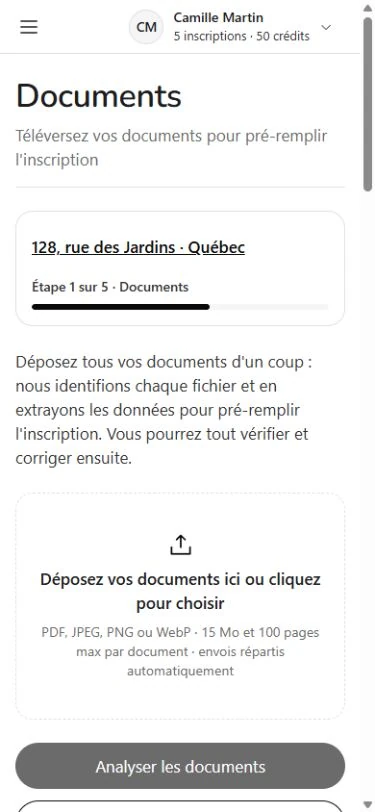
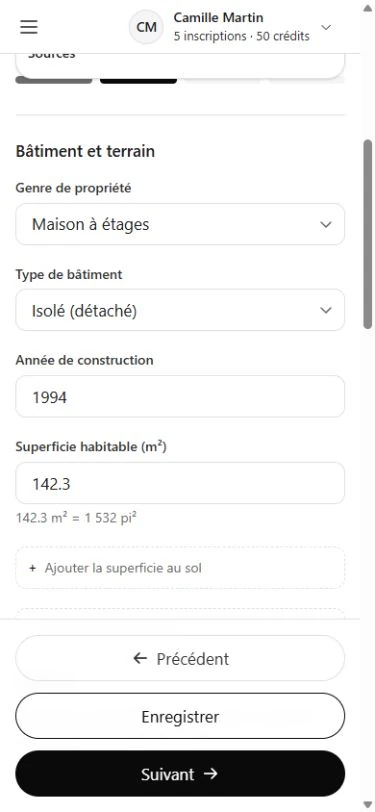
Review extracted data, check its sources and fill in the remaining property information.
Review your descriptions, arrange your photos and transfer fields into Centris with the entry assistant.
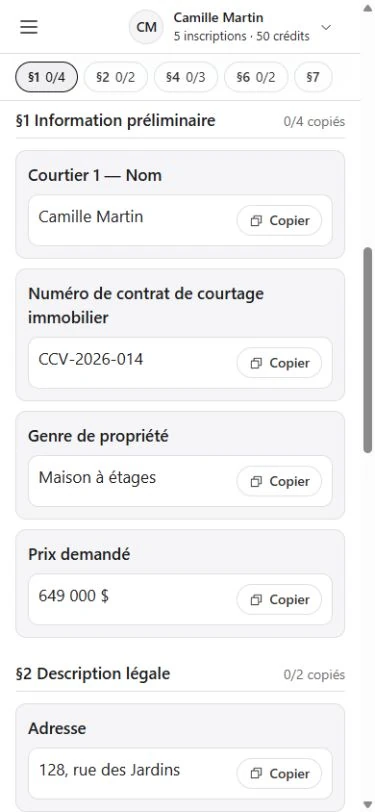
Application screenshots from a demo listing. The interface evolves with Listor.
Photo workshop
Virtual staging, twilight, furniture removal and targeted edits: prepare images that tell the property’s story. Compare the result with the original and choose the photos to keep.
Explore the toolsReview edited images and identify them as such according to your publishing platform’s requirements.
 BeforeAfter
Plans for your practice
Every tool in every plan. Choose the listing and creative credit allowances that fit your work.
For your first listings.
Billed monthly
Get startedFor an established practice.
Billed monthly
Get startedFor high-volume work.
Billed monthly
Get startedPrices in Canadian dollars, plus taxes. Allowances renew monthly, including on annual plans, and do not roll over.
The data entry assistant organizes fields for transfer into Centris. You copy the values, review the listing and publish in Centris. Listor is an independent tool with no direct connection to Centris or Realtor.ca.
You can bring together the brokerage contract, seller’s declaration, location certificate, tax bills and assessment roll documents. Useful documents vary by property type and listing.
Yes. French and English descriptions are drafts for you to review and adapt. You can adjust your writing preferences and edit the content before using it.
Yes. Plans differ in their listing and creative credit allowances. Tools that use credits require an available allowance or additional credits.
Listor runs in a browser on desktop, tablet and phone. Take measurements on site; a larger screen is helpful for detailed studio layouts.
Review data, descriptions and visuals, and complete missing fields. Extracted information and generated content can contain errors. Final review of the listing remains yours.

LISTOR
A well-prepared file. Your tools within reach. More room for the work that matters.
Create my account